An accident story
Friday, 5:42 p.m.
Almost there.
Then it happens.
A rear-end collision in France. Martin speaks German, Julien French. Only one has the app. Together they record what happened.
01 · The moment
First take a deep breath. Then step by step.
Martin is traveling from Switzerland in his car. Shortly before the destination there is a rear-end collision with Julien. Nobody is injured, the vehicles are safe. But now both of them are at a loss for words and an accident form.
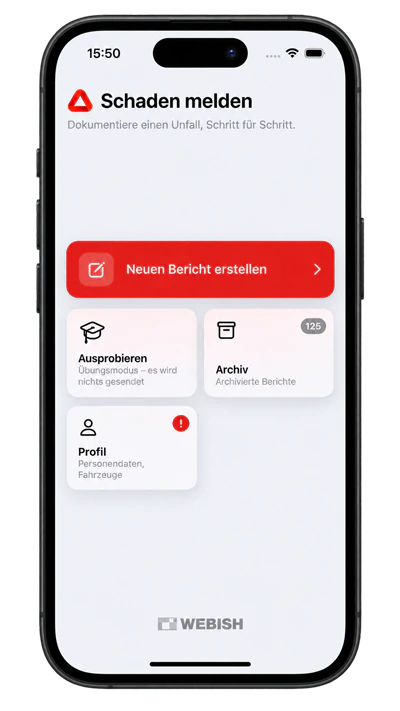
Martin opens the Accident Tool and starts a new report. The app guides him through the appropriate questions about the collision and the situation on site. The confusion becomes a next step.
02 · Prepared data
The app already knows his vehicle.
Martin selects his saved vehicle. Insurance, policy and policyholder are already stored. He can also transfer his previously recorded driving license data. He checks the information instead of retyping everything.
He places the location of the accident on the map. The app adds the address as well as the weather and lighting conditions at the time of the accident, even if the recording takes place a little later.

03 · The counterparty
“I don’t even have the app.”
“It still works.” Martin shows Julien the invitation as a QR code. Julien scans it with his iPhone camera and opens the App Clip: the small part of the app he needs now. No account, no downloading the full app.
Julien enters the vehicle, insurance and his personal details. Meanwhile, Martin takes photos and the sketch. Julien then shows his exchange code. Martin reads it and includes the information in the report.
Two drivers. At the same time one step further.
- 01
Open invitation
Julien opens the App Clip on his iPhone.
- 02
Capture in parallel
Julien adds his data. Martin documents the accident.
- 03
Accept data
Martin scans Julien's exchange code. The form data changes via QR code, without server transmission.
The App Clip records Julien's information. Martin creates the joint report in the app.
04 · Hold on together
Two languages. A documented process.
Martin reads the common questions in German, Julien in French. They record the circumstances of the accident, mark the first point of impact and add photos of the damage. If there are witnesses, their information will also be recorded.
Comments can be translated for the other recipient. They both check the summary and sign on the phone. This means that what you stated on site is recorded.

05 · Organize help
And who will help with the car now?
Martin would like to clarify what happens next with his damaged car. He has saved his TCS membership including membership number in his profile. The breakdown number can be reached directly. He calls and discusses how to proceed.
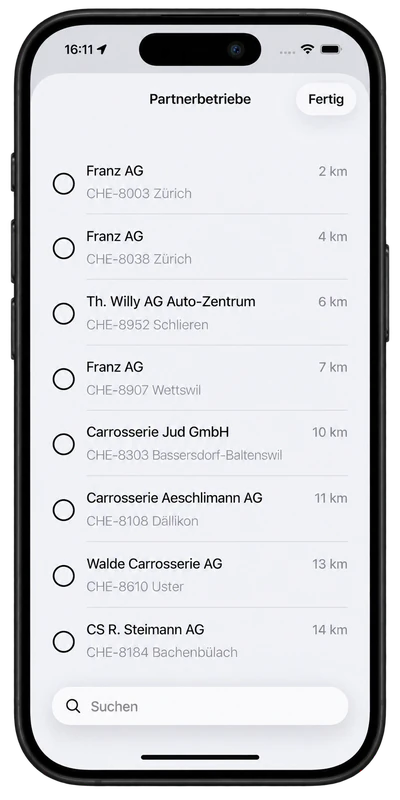
For repairs, he looks at nearby businesses. The app sorts workshops and glass companies within a radius of 100 kilometers by distance, even across national borders. Partners of his insurance are marked. Martin decides for himself which company he chooses.
06 · Send and hand over
Before they leave, everyone has their copy.
Martin confirms the information and sends the report. The platform creates the PDF in the language of the respective recipient and delivers it. Martin's Swiss insurance company is contacting their Green Card representative in France because of the accident in France.
Now Martin shows Julien his handover card. Julien scans the QR code on site and copies his read-only report copy into the App Clip. You don't have to install the full app yet.
The second code has a different task.
- 01
Confirm report
The platform creates and distributes the recipient PDFs.
- 02
Scan your own copy
Julien scans his personal handover card.
- 03
Keep document
The copy is write-protected. With the app already installed, the same code opens the app directly.
Invitation: Collect data. Handover card: accept the finished copy of the report.
07 · After the accident
The report remains. The information will come later.
Later, Martin looks in his archive: the finished PDF is there, as is the overview of delivery. Recipients who have not been reached can also be identified. Julien now installs the full app. The copy taken over in the App Clip goes into the archive with read-only protection.
If the insurance company is connected, its feedback also appears there: for example “received”, the claim number or the current processing status. Everyone only sees reports about their own party. If you want, you can be notified of new replies in the app.
More about data protection →
Accident Tool by WEBish
The accident is documented.
The next steps are clear.
Martin and Julien have recorded their information, taken over the copies and know what happens next. Even if only one person had the app at the beginning.
Get to know the process beforehand? In marked practice mode, the report only goes to the creator and is completely deleted after seven days.