Accident Tool – a WEBish product
Record a car accident with Accident Tool.
Record the details of a car accident at the scene. Add the people involved, photos and signatures to a digital report. Accident Tool is free for iPhone, iPad and Android and supports 29 languages. The other party can scan a QR code and enter their details in a browser without installing the app.
NEW Now also for Android on Google Play
When a moment becomes a process.
After an accident, a great deal of information, several people and many next steps come together. In the first few minutes, calm, structure and clear documentation are crucial, not only for the insurer but also for the next steps involving a repair shop, towing service or the police.
Today’s reality.
No common language.
The current process is fragmented:
- Find an accident report form
- Record information by hand
- Overcome language barriers
- Contact the insurer
- Distribute copies
- Arrange towing or a repair shop
- Send documents and wait for processing
The solution
That is exactly what the Accident Tool is for.
Guided. Multilingual. From start to finish.
The Accident Tool guides everyone involved through claim recording in a structured way. People, vehicles, insurance data, accident location, weather and light conditions, photos, circumstances, point of first impact, witnesses and signatures are captured where they are needed. Before submission, the details are confirmed once more. The server then creates the report in the language of each recipient, distributes it and returns the generated PDF to the app.
The modern process
From the first step to the response.
From a prepared profile to the report in the archive: the current app guides you through the claims process step by step.
Start or try it first
Start a report from the home screen. Practice mode covers the full process without sending to third parties. Practice reports go only to their creator and are completely deleted after seven days.
Save personal, vehicle and insurance data
Basic data can be prepared in the profile and reused for new claims. A broker can also be selected instead of an insurer.
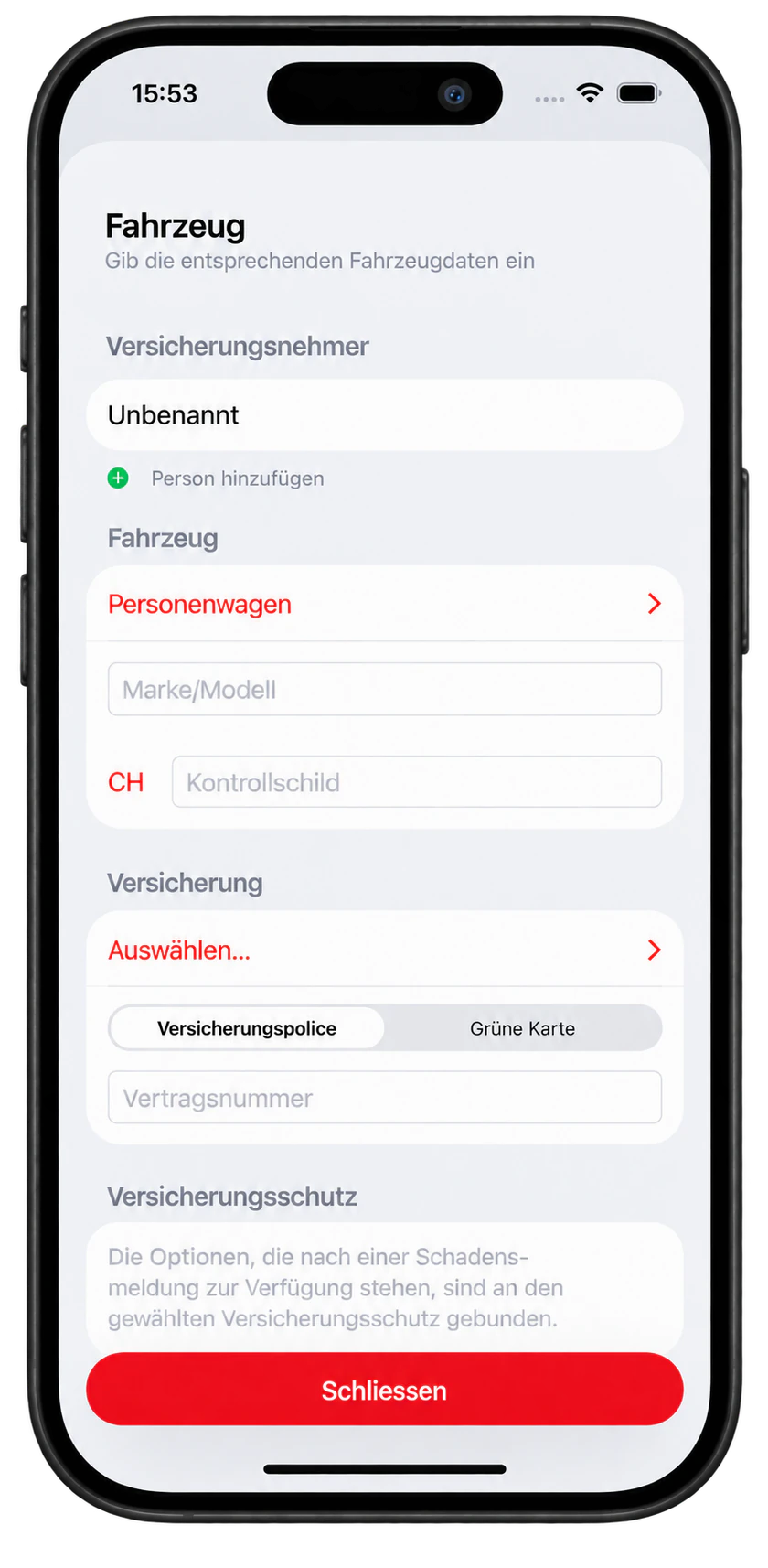
Transfer data between parties by QR code
Vehicle, policyholder, driver with driving licence and language are imported together by QR code. Without the app, the other party enters data in App Clip or the browser. The exchange uses QR codes without a server.
Create QR codes on Report Accident Tool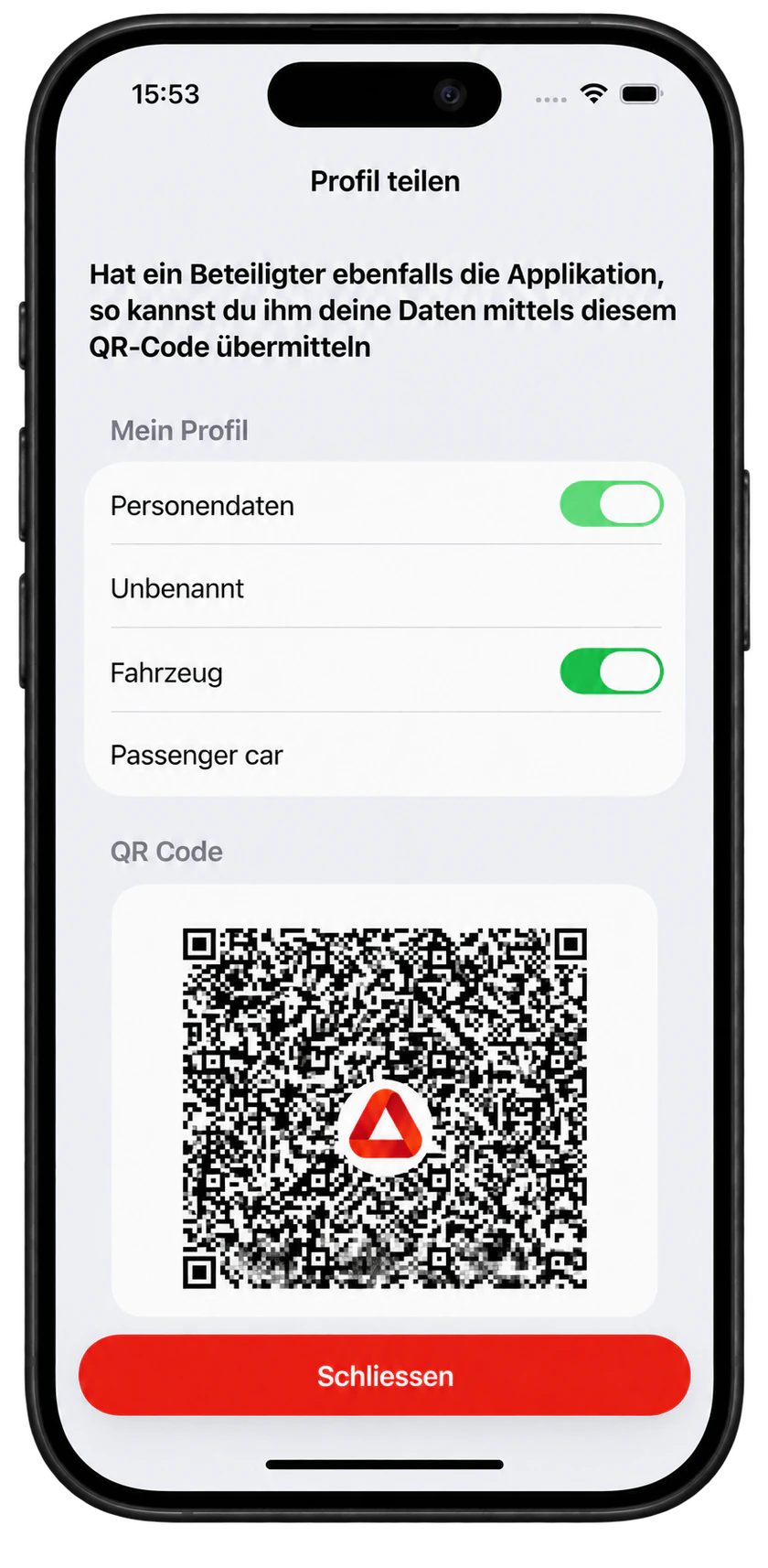
Record the damage type and situation in a structured way
Claim types depend on vehicle coverage and insurer. Collisions produce the European Accident Statement; other losses produce a damage report. Parking damage means an unknown responsible person. Parking damage under liability coverage and collisions with people are also separate cases; available choices depend on coverage and insurer.

Record place, time and accident conditions
The accident location is recorded on the map. Weather and light conditions refer to the time of the accident, even if the report is completed later.

Review and sign the details
Before completion, the key details are summarised. The signature is submitted together with the time it was signed.

Confirm the report and hand it to the server
The app does not send emails itself. After confirmation, the server creates and distributes the PDF report in the language of each recipient.

Select a repair shop and keep the report in the archive
Repair shops are sorted by distance and the insurer’s preferred shops are marked. The generated PDF comes back and remains available in the archive on the device.

App Clip & Browser
The other party joins in. Even without the app.
Two QR codes for two tasks: first exchange data, then receive your own report copy.
1. Enter data in parallel
The other party scans the invitation. On iPhone, App Clip opens without App Store installation or an account. On other devices, the same link opens the browser form. Meanwhile, the person reporting records location, photos and sketch.
2. Scan the exchange code
Vehicle with insurer, policyholder and driver with driving licence appear as a QR code. The person reporting imports them with “Read QR code”. Form data is not exchanged through a server.
3. Receive the copy at the scene
After submission, each party has a handover card. For up to two hours, the other party can import their copy once by QR code into the app or App Clip. The copy is read-only.
How App Clip and browser differ
The other-party form also works in a browser. Receiving the report copy requires an iPhone with the app or App Clip. The Clip does not create reports or send anything to insurers.
After submission
Report submitted. Stay informed.
The platform creates the PDF in each recipient’s language. For accidents abroad, it goes to the insurer’s Green Card representative in the accident country.
A copy in your own archive
The finished PDF returns to the archive. An App Clip copy moves into the archive as read-only after app installation. It remains available after deletion of the server content.
Status for each party
Connected insurers report receipt, claim number and processing status. A blue dot marks unread updates. Each party sees only their own messages.
Notifications on request
The app asks permission to notify you when the insurer responds. The lock screen only says there is news. App Clip sends no notifications; the app is required.
Feature overview
Everything needed for a complete claim record.
Recording
- Guided accident and claim recording
- Personal, vehicle and insurance data
- Multiple parties, objects and animals
- Pedestrian collision as a separate case
- Witnesses and injured occupants
- Parking damage by an unknown person, including liability coverage where offered
- Accident circumstances and point of first impact
- Location, time, weather and light conditions
- Photos, sketch, remarks and signature
- Driving licence number, category and validity dates
Sharing & Archive
- Confirmation step before submission
- Server creates the report in each recipient’s language
- Generated PDF returns to the device
- Archive with PDF, delivery overview and your own copy
- Receive the report copy at the scene by QR code
- Connected insurers’ status updates for each party
- Optional notification of new updates
- Share PDF and Mistra XML from the archive
- Archive shows parties that could not be reached
- QR code data exchange between parties
Languages & Support
- 29 languages for damage recording
- Each party can use their own language
- Shared questions in each party’s language
- Remarks are translated on the device for recipients
- Practice mode without sending to third parties
- App Clip and browser form for the other party
- iPhone, iPad, Android and browser reporting
- Green Card claims representatives and guarantee funds
- Broker can be selected instead of an insurer
Partners & Business solutions
- Around 2,950 insurers in 47 countries in the directory
- Repair shops sorted by distance
- Insurer-preferred shops marked
- Search by name, street, town and postcode
- Branding and custom information content
- QR codes for fleet, rental and company vehicles
- Partner interface with a report collection list
- Custom integrations can be developed
- Status interface for claim number and processing status
- Partner link per insurer and fleet QR code
Technology & Data flow
From the accident scene to the report in the archive.
The app records and checks the claim. Only after confirmation are the data handed to the server. There, the PDF report is created in the appropriate language for each recipient and distributed. The actual generated PDF is returned and stored on the device.
Record
People, vehicles, witnesses, location, photos, circumstances, point of first impact and signatures are recorded in a guided process.
Review
The details are summarised before completion and confirmed by the user.
Hand over to the server
The app hands the data to the server. It does not send the report itself by email.
Generate & archive
The server creates and distributes the recipient PDFs. The generated PDF returns and remains available in the app archive.
29languages for claim recording
Around 2,950insurers from 47 countries in the Europe-wide directory
PDF + XMLreport and structured Mistra data for downstream processing
Time reference
Weather and light at the time of the accident
Weather and lighting are added automatically for the actual accident time, even if the report is written hours later. The map location resolves to an address. Conditions are also considered when recording days later. They go to the insurance interface and Mistra, not the PDF.
Driving licence
Scan an ID instead of typing
The camera reads surname, first name, birth date and document number from the machine-readable zone of a driving licence or ID card. This works for profile, policyholder and driver, including the other party. Licence categories have individual validity periods. Number, category and validity dates can also be read by QR code if carried by the licence.
Multilingual
Each party in their own language
The language is selected for each party. Shared questions are shown to that person in their language; remarks can be translated for recipients.
Archive
The PDF that was actually sent
The PDF generated by the server returns to the device. This keeps exactly the document used in the downstream process available.
Vehicle data
QR code concept
Vehicle and personal data can be prepared and selectively transferred at the scene.
Create QR codes on Report Accident ToolPartners
Repair shops by distance
Workshops and glass repair businesses within 100 km appear by distance, including across borders. Insurance partners are marked; drivers choose freely. Name search also finds more distant businesses. Search by name, street, town and postcode remains available.
For organisations
Expandable for your organisation.
Partner link, claim catalogue and delivery mode are tailored to use. The partner interface supplies reports; the status interface brings insurer responses into the app. Branding, information tiles, partner selection and further integrations are planned and developed for the specific use and existing processes.
Europe & Further processing
More coverage for cross-border claims.
The current version significantly expands insurer data, Green Card cases and structured downstream processing.
Europe-wide directory
Around 2,950 insurers in 47 countries
The directory contains around 2,950 insurers from 47 countries, Green Card representatives, brokers and claims handlers. Selection follows the registration country. Missing insurers can be entered manually.
Green Card
Claims representatives and guarantee funds
For foreign and unidentified vehicles, the relevant claims representatives and guarantee funds can be taken into account.
Structured downstream processing
Insurer interface and Mistra
The submission includes, among other things, circumstances as codes, point of first impact, repair shop, estimated amount, occupants, witnesses, policy number and Green Card number. PDF and Mistra XML can be shared from the archive.
Data protection
Clear deadlines. Your copy stays.
Report personal data is stored encrypted on the server and deleted after 30 days. The PDF returns to the app and is saved in the device archive. Reports on the device remain available. WEBish keeps no permanent personal accident dossier.
30 days on the server
The platform creates and delivers reports. Personal report content is deleted from the server after 30 days.
Seven days for practice
Practice mode is marked on every screen. Practice reports go only to their creator and are completely deleted after seven days.
The profile stays on the device
People, vehicles, driving licences and club memberships are stored in the device profile. Parties exchange profiles by QR code.
No tracking or advertising
Statistics are anonymous. Only data that cannot be linked to a specific person may remain. Optional notifications show no personal details on the lock screen.
Report Accident Tool
Create QR codes on Report Accident Tool.
Vehicle and fleet QR codes are created on the separate Report Accident Tool website. Open the link below. Browser reporting with a partner link per insurer is also available there.
Fleets and company vehicles
A fleet QR code provides access to reporting damage for company vehicles. The browser reporting takes you through the same sequence of steps as the app and can also be used without installing the app.
Insurance cards with QR codes
Insurers and brokers can give customers an exchange code with prepared profile data. The app reads it at the accident scene.
Other party without the app
The form at report.accident-tool.ch/clip records vehicle, policyholder and driver. The other party then displays a QR code to scan.
Everyone in their own language.
The language is chosen for each party involved. Common questions appear for that person in their language. Comments can be translated on the device for other recipients. A total of 29 languages are available.

Language per party
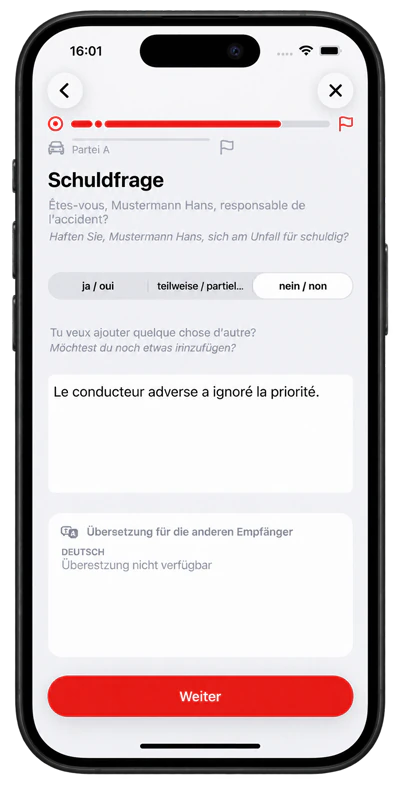
German ↔ Français

29 languages
EnglishČeštinaDanskDeutschΕλληνικάEspañolEestiSuomiFrançaisHrvatskiMagyarItalianoLietuviųLatviešuNederlandsNorskPolskiPortuguêsSlovenčinaSlovenščinaСрпскиSvenskaУкраїнськаБългарскиÍslenskaRomânăGaeilgeLëtzebuergeschMalti
Data quality and security.
Structured information, photos, location and time support the traceability of a claim.
Consistent information
Guided recording helps ensure that all relevant information is complete.
Time and location reference
Automatic recording of time and location documents the claim in both space and time.
Documentation of visible damage
Photos and sketches show the condition immediately after the incident. Photos are georeferenced and marked with the date and time.
Sharing with defined recipients
Data is forwarded only to designated insurers, partners and parties involved.
Protection against unintended changes
A completed report is documented and traceable, but can no longer be changed.
Solutions and target groups
The Accident Tool supports different roles in the claims process.
Insurers and claims organisations
Structured data directly from the scene can enable faster claim identification and coordination.
Fleet operators
Overview and tracking of all incident records across the company fleet.
Companies with business vehicles
Structured documentation and sharing for damage to company vehicles, supporting internal claims management.
Car rental and car-sharing providers
Digital recording of rental vehicle damage with standardised documentation.
Garages and repair shops
Detailed damage documentation from the scene supports repair planning.
Towing services
Operational information and damage documentation from one source to optimise deployment.
End users involved in a claim
A calm, structured path through the first phase after an accident, with clear documentation.
Insurers · Brokers · Fleets
A clear path from loss to processing.
App and browser record claims structurally. Insurers receive reports by email or partner interface and can send processing updates to each party.
Insurers: collect reports directly
The partner interface offers reports in a collection list. Begin with practice reports, then run alongside email delivery, finally use the interface exclusively.
Updates instead of uncertainty
The status interface conveys receipt, claim number and progress. Required documents, an agreed inspection and closure can also be reported. Each party sees only their own updates.
Fleets: start at the vehicle
Fleet QR codes for company vehicles lead to the browser reporting. Drivers go through the same guided process as in the app. This means that the damage recording can also be used without installing the app.
Brokers: provide prepared data
Brokers can provide exchange QR codes for insurance cards. Vehicle, policyholder and driver details can then be imported at the scene.
Partner link and claim catalogue
Each insurer can use its own browser-reporting partner link. Claim types follow coverage; insurers can hide types they do not accept.
Dashboard for platform operations
The dashboard offers map, deliveries, usage and directories of insurers, representatives, brokers and partners, plus claim catalogues, contractual partners, delivery modes and documentation.
Use cases
The Accident Tool in different scenarios.
Accident with two or more parties
All parties can use the Accident Tool to document their perspective consistently.
Parties without a common language
Each party may read the common questions in its own language. A total of 29 languages are available.
Damage without a third party
All relevant information is recorded in a structured way even for single-vehicle damage.
Collision with a pedestrian
A dedicated case records collisions with people correctly and tells users to call the police if anyone is injured.
Damage to an object
Accidents involving damage to buildings, installations or other objects are documented.
Wild animal damage
Specific recording of vehicle damage caused by wild animals with the relevant details.
Roadside assistance at hand
Club and membership number can be stored in the profile. Breakdowns and technical faults can also be documented. The assistance number is accessible from the home screen. Membership is not in the report; the app does not check coverage.
Rental vehicle
Rental vehicle data can be preloaded by QR code and documented quickly.
Fleet or company vehicle
A fleet QR code on the company vehicle opens the browser reporting for guided damage recording, even without app installation. Vehicle-specific and fleet-related data support company-wide claims management.
Glass damage
Glass damage is among the selectable damage types where it matches the recorded coverage.
Made for the moment that matters.
Stress, confusion and shock are normal after an accident. The Accident Tool is designed to remain easy to understand under pressure, with large screens, clear next steps and little text. People affected by stress or shock are not confronted with impossible tasks.

Podcast
A conversation about the Accident Tool
Background, concept and benefits of the digital accident assistant.
Podcast · English · 1:53
Accident Tool: A Quick Overview in English
A short English overview of Accident Tool: guided accident reporting, QR data exchange, 29 languages, and participation without the other party needing to install the app.
Explainer video
The accident tool explained
A concise overview of the process and possibilities.
Comic
An accident, simply explained
The short comic shows the digital process step by step.
 Podcast · German
Podcast for insurance professionals
Digital accident reporting from an insurance perspective: how structured information from the accident scene can support claims handling.
Podcast · German
Podcast: Using the app in practice
A detailed guide for road users: how Accident Tool works and how to use the app step by step to record an accident.
Clip · German
Clip for end users
A short introduction to the Accident Tool.
Upcoming developments & extensions
What comes next. What is possible on request.
The Accident Tool is available in the Apple App Store and Google Play. If you are interested, further functions and individual extensions can be planned and developed together.
Custom integrations upon request
Upon request, additional connections can be developed to suit a company's processes and target systems.
Additional insurance types
Additional insurance types and claims can be integrated on request, including household contents claims and damage to works of art and antiques.
New: Android is here
Since October 3, 2026, the Accident Tool is also available for Android on Google Play. Download the right app for iPhone, iPad or Android now.
Video communication
Video communication can be optionally integrated upon request - for example for live video support between parties involved or with insurance agents.
Additional services
Additional services can be integrated into the claims process if necessary. We will coordinate the options with you.
Partner connection
Go live step by step.
The existing partner interface can be introduced in three steps. Additional requirements are clarified together.
1. Test with practice reports
First, check the connection in test mode with practice reports.
2. Deliver in parallel
Then interface and email delivery run in parallel.
3. Switch to the interface
After the parallel phase, reports are provided only through the partner interface.
About us
People, technology and one shared goal.
Accident Tool is built by a focused team. Experience in claims processes, development, marketing and design comes together in a solution that supports people when it matters most.
-

-

-

-

Marven Klossner
Business Development DACH / Strategic Partnerships & Marketing
Frequently asked questions
Answers to your questions.
How are data processed?
After confirmation, the platform creates and distributes reports in recipients’ languages. Personal data is encrypted on the server and deleted after 30 days. Reports on the device remain.
Does recording work without a common language?
Yes. A separate language can be selected for each party involved. Shared questions are shown to that person in their language; remarks can be translated for recipients.
Which languages are supported?
A total of 29 languages are available: English, Czech, Danish, German, Greek, Spanish, Estonian, Finnish, French, Croatian, Hungarian, Italian, Lithuanian, Latvian, Dutch, Norwegian, Polish, Portuguese, Slovak, Slovenian, Serbian, Swedish, Ukrainian, Bulgarian, Icelandic, Romanian, Irish, Luxembourgish and Maltese.
Can I try the process without sending anything?
Yes. Practice mode follows the same process, is marked on every screen and sends nothing to third parties. The recipient address appears before submission. Practice reports go only to their creator and are completely deleted after seven days.
Do all parties need to have the app installed?
No. The other party enters data in App Clip on iPhone or the browser form and passes it by QR code. Later receipt of the report copy by handover code requires the app or App Clip on iPhone.
How are reports delivered?
The app does not send emails itself. It hands the confirmed claim to the server. The server creates the PDF report in each recipient’s language and distributes it. The generated PDF is then stored on the device.
How are repair shops included?
Repair shops are shown in a list ordered by distance. The insurer’s preferred shops are marked. Search finds shops by name, street, town and postcode regardless of distance.
What applies to foreign or unidentified vehicles?
The current version supports Green Card claims handlers and guarantee funds. The European directory contains around 2,950 insurers in 47 countries.
Can the Accident Tool be integrated into business systems?
Yes. The partner interface offers reports for collection. The status interface conveys receipt, claim number and progress per party. Start in test mode, then alongside email, finally interface-only. Further custom integrations are possible, planned and developed around existing processes and target systems.
Which platforms are supported?
The app is available for iPhone and iPad in the Apple App Store and for Android on Google Play. The Android app has been available since October 3, 2026. The browser reporting on report.accident-tool.ch allows the damage to be recorded even without installing the app. The App Clip complements the iOS app on the iPhone for data sharing and report copying.
How does the QR code work for fleet and rental vehicles?
Company vehicles can use a fleet QR code for browser reporting. Insurers and brokers can also issue exchange QR codes with prepared profiles that the app reads at the scene.
App download and support
Start now. On iOS and Android.
Available in the Apple App Store and now on Google Play.
Android · New to Google Play
The Accident Tool for Android – available since October 3, 2026:
Now on Google PlayBrowser reporting and fleets
Claim report without app installation, partner links and fleet QR codes:
Open Report Accident ToolSupport and further information
Questions or problems with use:
Use our contact form. Your enquiry goes directly to the Accident Tool team.
Go to contact formDemo and pilot
From the first conversation to pilot operation.
We guide you through a structured process, from the product demo to a successful pilot.
Demo
Discover the Accident Tool through realistic scenarios.
Clarify requirements and processes
Your specific requirements and existing processes are documented.
Define features, branding and integrations
Customisations and integrations for your organisation are planned.
Prepare the pilot
The environment is configured, the team is trained and the first users are activated.
Run and evaluate the pilot
The Accident Tool is tested under real conditions and feedback is collected.
Contact
Talk to our team.
Do you have questions about the Accident Tool or would you like to start a pilot? We are happy to help.