Structured recording
Collisions, glass, hail, theft and other damage: photos, sketches, impact points and signatures provide a better basis for assessment.
Insurers · Brokers · Fleets
Accident Tool connects on-site accident recording with your claims process. Policyholders capture information, photos and signatures through a guided app or browser flow. Receive a readable report by email or structured data through the partner interface – a foundation for fewer follow-up questions and a faster start to processing.

Collisions, glass, hail, theft and other damage: photos, sketches, impact points and signatures provide a better basis for assessment.
Reusable profiles, document scanning and QR exchange can reduce repeated entry and transcription errors.
29 recording languages, a PDF in the recipient language and delivery to the Green Card representative in the country of the accident.
An archived report copy plus a claim number and party-specific status from connected insurers can reduce status enquiries.
Workshop and glass repair searches highlight insurance partners. Dedicated partner links and fleet QR codes simplify access.

Capture the type of damage, location, photos and circumstances.

The other party enters details using an App Clip or browser; QR codes transfer them directly between devices.

Connected insurers return claim numbers and processing updates to the relevant party.
Original views with training and example data. The app views shown are in German; the app supports 29 languages.
Around 2,950 insurers in 47 countries and over 2,800 additional Green Card representative entries support international routing. Representative data is maintained through ongoing automated research, cross-checking and updates. This can reduce manual searches, returned reports and forwarding. The two directory figures count different types of entries.
Begin with PDF reports in your existing email inbox. A partner interface with a collection list supports transfer to your system; status updates provide the return channel. Data mapping, error handling and operational responsibilities are agreed together. Integration, customisation and operating scope and costs are agreed separately.
First, check the connection in test mode with practice reports.
Then interface and email delivery run in parallel.
After the parallel phase, reports are provided only through the partner interface.
The insurer decides on assessment, coverage and settlement. An available damage category is not confirmation of coverage. Branding, custom information tiles and additional systems are planned individually; a native Android app is not a guaranteed standard feature.
Expand each topic to explore the main features. The full product brochure adds details, app screens and practical examples.
The app records and checks the claim. Only after confirmation are the data handed to the server. There, the PDF report is created in the appropriate language for each recipient and distributed. The actual generated PDF is returned and stored on the device.
People, vehicles, witnesses, location, photos, circumstances, point of first impact and signatures are recorded in a guided process.
The details are summarised before completion and confirmed by the user.
The app hands the data to the server. It does not send the report itself by email.
The server creates and distributes the recipient PDFs. The generated PDF returns and remains available in the app archive.
Time reference
Weather and lighting are added automatically for the actual accident time, even if the report is written hours later. The map location resolves to an address. Conditions are also considered when recording days later. They go to the insurance interface and Mistra, not the PDF.
Driving licence
The camera reads surname, first name, birth date and document number from the machine-readable zone of a driving licence or ID card. This works for profile, policyholder and driver, including the other party. Licence categories have individual validity periods. Number, category and validity dates can also be read by QR code if carried by the licence.
Multilingual
The language is selected for each party. Shared questions are shown to that person in their language; remarks can be translated for recipients.
Archive
The PDF generated by the server returns to the device. This keeps exactly the document used in the downstream process available.
Vehicle data
Vehicle and personal data can be prepared and selectively transferred at the scene.
Create QR codes on Report Accident ToolPartners
Workshops and glass repair businesses within 100 km appear by distance, including across borders. Insurance partners are marked; drivers choose freely. Name search also finds more distant businesses. Search by name, street, town and postcode remains available.
For organisations
Partner link, claim catalogue and delivery mode are tailored to use. The partner interface supplies reports; the status interface brings insurer responses into the app. Branding, information tiles, partner selection and further integrations are planned and developed for the specific use and existing processes.
Two QR codes for two tasks: first exchange data, then receive your own report copy.
The other party scans the invitation. On iPhone, App Clip opens without App Store installation or an account. On other devices, the same link opens the browser form. Meanwhile, the person reporting records location, photos and sketch.
Vehicle with insurer, policyholder and driver with driving licence appear as a QR code. The person reporting imports them with “Read QR code”. Form data is not exchanged through a server.
After submission, each party has a handover card. For up to two hours, the other party can import their copy once by QR code into the app or App Clip. The copy is read-only.
The other-party form also works in a browser. Receiving the report copy requires an iPhone with the app or App Clip. The Clip does not create reports or send anything to insurers.
The platform creates the PDF in each recipient’s language. For accidents abroad, it goes to the insurer’s Green Card representative in the accident country.
The finished PDF returns to the archive. An App Clip copy moves into the archive as read-only after app installation. It remains available after deletion of the server content.
Connected insurers report receipt, claim number and processing status. A blue dot marks unread updates. Each party sees only their own messages.
The app asks permission to notify you when the insurer responds. The lock screen only says there is news. App Clip sends no notifications; the app is required.
The current version significantly expands insurer data, Green Card cases and structured downstream processing.
Europe-wide directory
The directory contains around 2,950 insurers from 47 countries, Green Card representatives, brokers and claims handlers. Selection follows the registration country. Missing insurers can be entered manually.
Green Card
For foreign and unidentified vehicles, the relevant claims representatives and guarantee funds can be taken into account.
Structured downstream processing
The submission includes, among other things, circumstances as codes, point of first impact, repair shop, estimated amount, occupants, witnesses, policy number and Green Card number. PDF and Mistra XML can be shared from the archive.
Report personal data is stored encrypted on the server and deleted after 30 days. The PDF returns to the app and is saved in the device archive. Reports on the device remain available. WEBish keeps no permanent personal accident dossier.
The platform creates and delivers reports. Personal report content is deleted from the server after 30 days.
Practice mode is marked on every screen. Practice reports go only to their creator and are completely deleted after seven days.
People, vehicles, driving licences and club memberships are stored in the device profile. Parties exchange profiles by QR code.
Statistics are anonymous. Only data that cannot be linked to a specific person may remain. Optional notifications show no personal details on the lock screen.
The language is chosen for each party involved. Common questions appear for that person in their language. Comments can be translated on the device for other recipients. A total of 29 languages are available.

Language per party
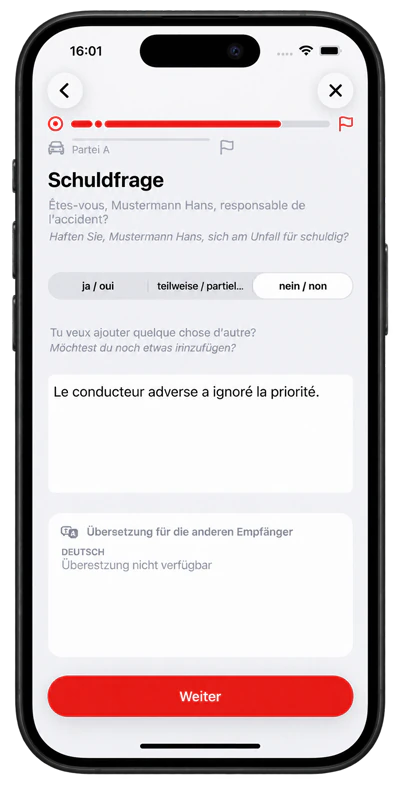
German ↔ Français

29 languages
The full browser report guides users through a claim. The other-party form instead supplies details for an existing report. In the fleet generator, enter shared details once, add vehicles individually or as a list and create PDF cards or a ZIP. Prepared codes can be scanned or uploaded as an image in the browser report.
A pilot compares similar damage types and case complexity with your existing process. Measure active handling time separately from waiting time, and assess cross-border cases and repeated contacts separately.
Illustrative calculation, not a forecast: 1,000 cases × 5 minutes saved = about 83 hours. At CHF 80 per hour, that is roughly CHF 6,667 in gross labour value, before project and operating costs. Released capacity does not automatically become a budget saving.
| Time saved per case | Hours released | 8-hour workdays |
|---|---|---|
| 15 minutes | 250 hours | 31.3 days |
| 30 minutes | 500 hours | 62.5 days |
| 45 minutes | 750 hours | 93.8 days |
| 60 minutes | 1,000 hours | 125.0 days |
Digital accident reporting from an insurance perspective: how structured information from the accident scene can support claims handling.
In a demo, we review a specific case, your preferred intake channel and updates to policyholders. We then agree the pilot scope and success criteria together.
Business demoProduct version: App 2.53, September 2026 documentation. Directory figures from the product brochure dated 21 September 2026. Potential benefits are not guaranteed outcomes.